Parameterized Queries and SQL Injection
Learning Objectives
- You can explain why building SQL strings directly from input is unsafe.
- You can recognize the safe, parameterized form of a query in application code.
- You can explain what the
tprefix does in apsycopgquery and why leaving it out is dangerous.
So far, the routes in the study tracker project have only read data. The queries in those routes do not depend on any value from the browser, so the way values are passed into SQL has not yet mattered.
The next chapters change that. Creating, deleting, and updating rows all require passing user-provided values into SQL. Before we do that, it is important to understand how those values should be passed, and why the obvious approach is the wrong one.
Building SQL Strings from Input Is Unsafe
The obvious approach is to build the SQL statement as a string and paste the input value into it. For example, suppose we wanted to add a new tag using a value called name received from a form. A tempting but unsafe route might look like this:
@app.post("/tags")def create_tag(name: str = Form(...)):    sql = f"""    INSERT INTO tags (name)    VALUES ('{name}')    """
    with get_connection() as conn:        conn.execute(sql)
    return RedirectResponse("/tags", status_code=303)
This looks reasonable at first glance, but one detail matters a lot: the input value is being pasted directly into the SQL text.
The reason that is a problem can be stated simply:
- the query text is being built as one larger string,
- the user input is pasted directly into that string,
- and the database can no longer clearly distinguish the SQL structure from the input value.
That creates an SQL injection risk.
What SQL Injection Means
In practical terms, SQL injection means that input intended as data is accidentally treated as part of the SQL command.
That can lead to:
- broken queries,
- unexpected filtering,
- data leaks,
- or writes that should never have happened.
Even a value that only contains an unexpected quote character can already break the query. More serious input can change what the query does.
For instance, if the input from the form is '); DELETE FROM tags; --, the resulting SQL string would look like this:
INSERT INTO tags (name)VALUES (''); DELETE FROM tags; --')The insert runs, then a delete runs, then the rest of the original statement is commented out with -- that turns the final quote into a harmless comment. The application did not ask the database to delete anything; the input sneaked past the boundary between SQL structure and SQL data.
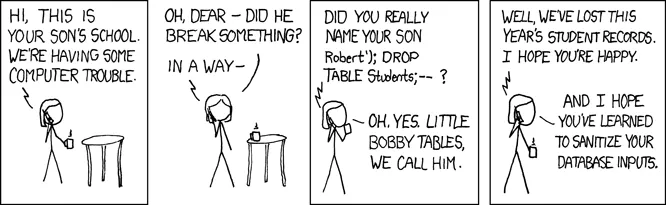
The XKCD comic “Exploits of a Mom” illustrates this idea:
Keeping SQL Structure and Data Separate
The safe version of the same idea is called a parameterized query. In a parameterized query, the SQL structure is written out as SQL, and the user-provided values are passed separately as parameters. The database then combines them safely, without letting any input value be reinterpreted as SQL.
In this course, with psycopg and Python 3.14, parameterized queries are written using template string literals, also known as t-strings. A safe version of the create_tag route looks like this:
@app.post("/tags")def create_tag(name: str = Form(...)):    with get_connection() as conn:        conn.execute(t"""            INSERT INTO tags (name)            VALUES ({name})            """)
    return RedirectResponse("/tags", status_code=303)
The important parts of the syntax are:
- the
tprefix marks a template string query, {name}shows where the Python value should be used,- and
psycopgkeeps the SQL structure and the data value separate when the query runs.
Read this in words as: the SQL is the INSERT INTO tags (name) VALUES (...) structure, and name is a data value supplied to that structure. The database never sees the input value as part of the SQL command, only as a value passed into the placeholder.
The
psycopgdocumentation on template string queries explains the mechanism in more detail.
The t Prefix Is Not Decorative
It is easy to glance at t"""...""" and assume the t is a small stylistic marker. It is not. The t prefix is what turns the string into a template string and what causes psycopg to treat {name} as a parameter.
Without the t, the same-looking code behaves completely differently. An f-string such as:
# UNSAFE: do not do thisconn.execute(f""" INSERT INTO tags (name) VALUES ({name}) """)substitutes name directly into the SQL text before the query reaches psycopg. That is the unsafe behavior from the first example in this chapter.
The difference between safe and unsafe can come down to one character. When you copy a query into your own project, check that:
- the query uses
t"""...""", notf"""..."""or a plain"...", - every user-provided value is referenced through
{value}inside that t-string, - and no value is assembled into SQL through ordinary string concatenation or
.format().
If in doubt, compare your query against an example in this part. Safe queries in this course always use the t prefix.
What to Check When a Query Uses Input
When a query depends on a value from the browser, it is useful to check three things:
- is the SQL structure written as SQL, not assembled from input text?
- are the user-provided values passed separately as parameters?
- would the route still behave sensibly if the input contains unusual characters?
A useful habit is to make parameterization feel boring and normal. It should simply be the default way to run application queries.
Safe create route
0 / 5 points
Which version of create_tag() keeps the SQL structure separate from the form input name?
Check Your Understanding
- Why is building SQL strings directly from input unsafe?
- In the safe example, which part is the SQL structure and which part is the data value?
- What changes if the
tprefix is left out of a query that looks otherwise identical?
AI Study Aid
Create a chapter diagram
We're looking into to what extent AI-generated diagrams could help with studying.
Use this study aid to generate an AI-generated visual summary of the material you just studied.
Each diagram style emphasizes the content in a different way, so you can choose the focus
that feels most useful.
Using the diagram generator is voluntary and does not affect your course progress. We encourage
you to try it out and see if it helps, but it's totally up to you! Your answers help us understand
how to make better study aids in the future.
Broken rename form input
0 / 5 points
Consider this broken route:
@app.post("/tags/rename")def rename_tag(current_name: str = Form(...), new_name: str = Form(...)):    sql = f"""    UPDATE tags    SET name = '{new_name}'    WHERE name = '{current_name}'    """
    with get_connection() as conn:        conn.execute(sql)
    return RedirectResponse("/tags", status_code=303)
Which form input would make the route change all tag names to SANITIZE INPUTS!?